Intelligent Data Report

Avesoft Software System

Avesoft Software System is a proprietary inspection and reporting software that streamlines inspection with automated and quick reports and accurate data analysis, giving operators and inspectors easy access to results for faster, informed decisions.
Streamlined, data-driven, and built to empower faster, more informed decisions
Intelligent Software for Smarter Inspections and Seamless Reporting
01

Data Tagging &
3D Mapping

Avesoft provides easy access to 3D maps, streamlines workflows with effective data tagging, and boosts productivity and collaboration across various industries.
3D point cloud visualization with colored dots in red, yellow, and green forming geometric shapes and objects floating in a dark space.
02

Real-Time Data Presentation

Avesoft creates a digital twin of the inspected asset, enabling you to revisit and repeat the inspection virtually. This allows you to capture and review any details anytime after the initial inspection.
3D sonar point cloud visualization of underwater structure with three inset underwater camera views showing equipment and seabed.
03

Automated Reporting

Right after the inspection, your data is instantly available on Avesoft, giving you immediate insights and the ability to generate professional reports in just a few clicks.
Streamlined, data-driven, and built to empower faster, more informed decisions
Intelligent Software for Smarter Inspections and Seamless Reporting
Onboard camera view showing SKYRON2 probe attached under the wing with various flight data overlays.
In-Flight: Real-Time Control and Data Capture
Apps provide seamless real-time control, monitoring, and data visualization, enabling immediate decision-making and reducing the need for repeat flights.
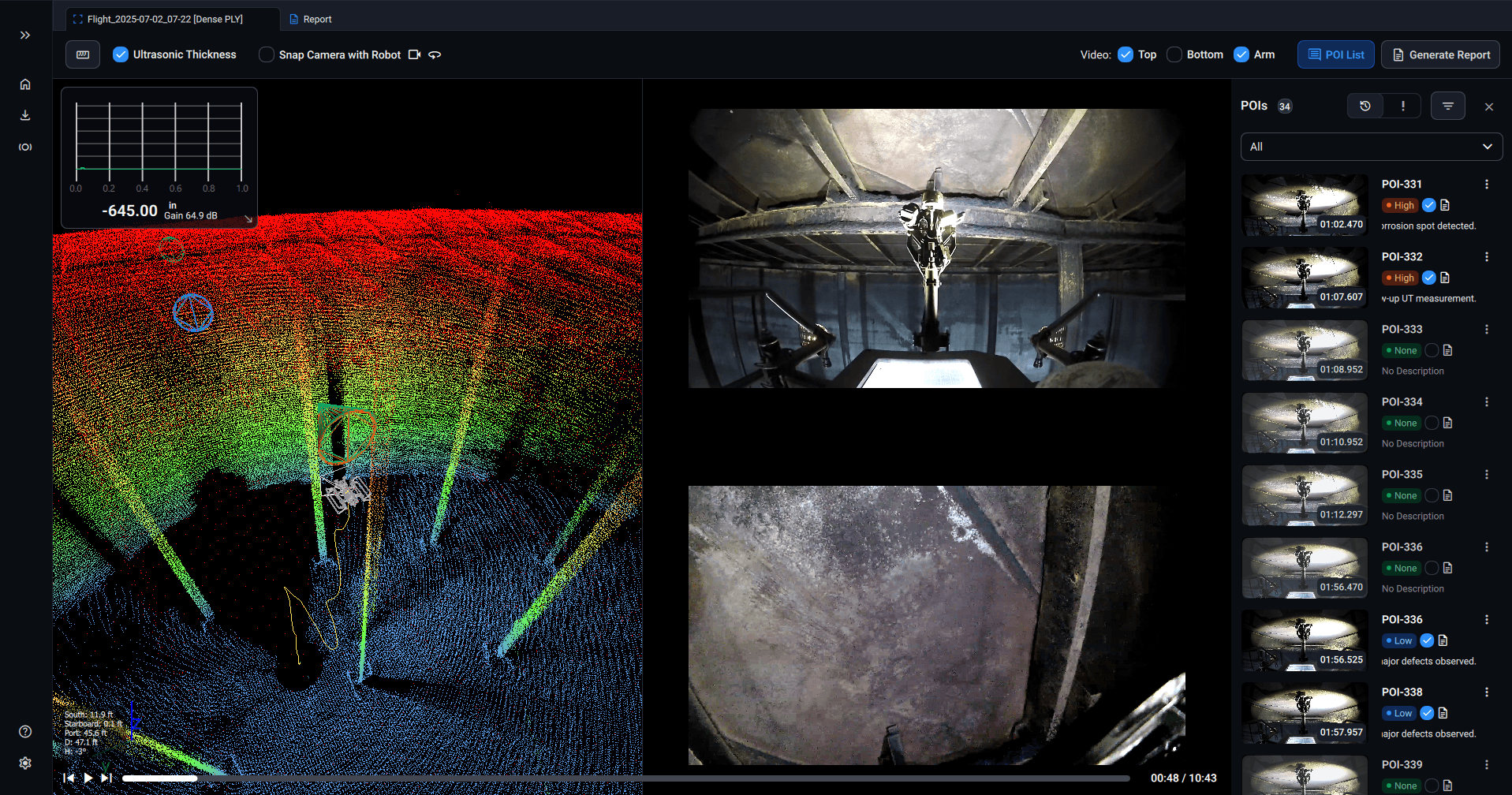
Software interface showing underwater drone inspection with ultrasound thickness graph, 3D sonar view, and POI details including underwater photos and measurements.
Post-Flight: Review and Adjustment
The Processing App offers flight replay and post-flight analysis, allowing users to refine data and ensure
accurate measurements for reliable inspection results.
Screenshot of a report page titled POI-341 showing a flight timestamp, criticality status, payload angle, a central image of a robotic arm or machinery, a line graph with numerical data, and two colored 3D point cloud images at the bottom with an Export PDF button below them. On the right side, a vertical list of thumbnail images and timestamps serves as report details navigation.
Reporting: Comprehensive and Automated Outputs
Generate detailed reports with the Windows App for in-depth documentation, or use the Android App for quick, automated summaries.
It offers flexible reporting options to suit project needs and timelines.
Contact Us
Thank you! Your submission has been received!
Please use your company email (e.g., name@yourcompany.com
Avestec
Blue information icon inside a square with rounded corners.
YouTube play button icon with a black triangle in the center of a rounded white rectangle.
Diagram illustrating the differences between technical SEO, on-page SEO, and off-page SEO with key elements listed under each category.
Get In Touch
Unit 106, 4268 Lozells Ave, Burnaby BC VSA 0C6, CANADA
Suite 5600, 2800 Post Oak Blvd, Houston, TX 77056, USA
info@avestec.com
+1 888 842 5151